
Organizational capabilities and architecture
From a personal AI workspace to shared team applications, and how tasks run on your infrastructure.
Organizational capabilities
LinkSense gives each member their own AI workspace. What one person builds there can become a capability the organization shares, governs, and reuses across teams.
| Capability | What the organization can reuse |
|---|---|
| Knowledge bases | Give AI access to authorized organizational documents. Built-in document parsing, indexing, and retrieval are available in Full. |
| Skills | Turn a proven way of working into a repeatable procedure. |
| MCP servers | Give tasks controlled access to business systems and actions. |
| Plugins | Package Skills and MCP integrations for reviewed distribution. |
From personal work to team reuse
Teams can develop and test Skills and Plugins in a personal workspace, submit a fixed release for administrator review, and publish it for others to install. Updates are explicit. See release review and governance for the approval workflow.
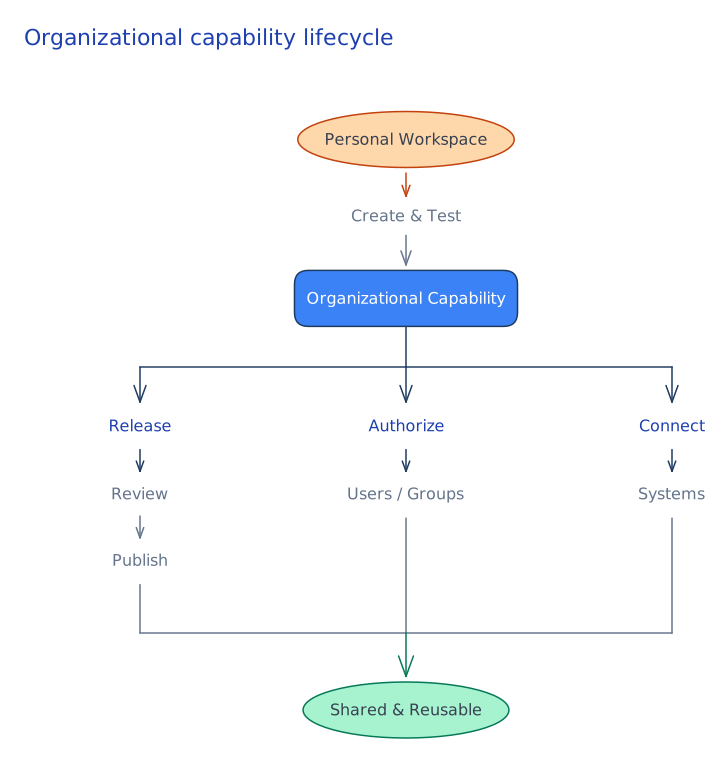
Connect organizational resources
Knowledge-base owners can grant access to selected users or groups. Connectors provide access to documents and email, and MCP can integrate systems such as ERP or CRM. Connections and their credentials are managed separately: delegate the work, not the credentials. Check that the chosen model supports tools as well as connecting successfully.
Applications: put capabilities to work
An Application combines maintained instructions and model configuration with Knowledge, Skills, Plugins, and MCP connections. It is a reusable entry point, not an autonomous agent: an authorized member starts and owns their own task.
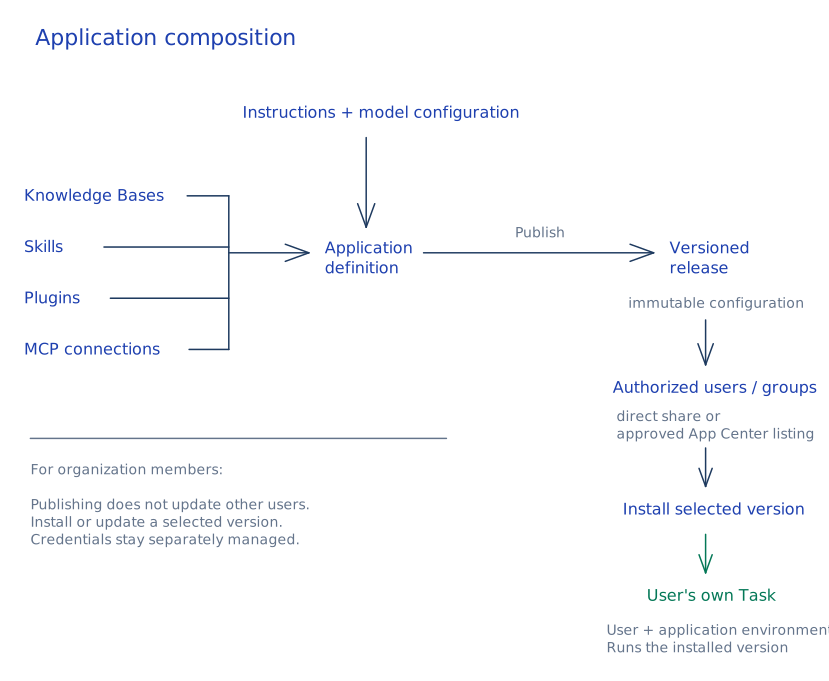
Example: a finance application
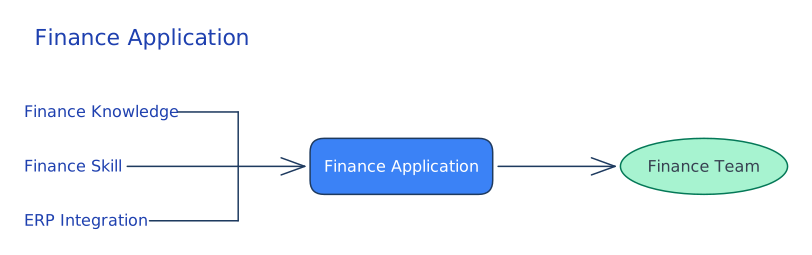
A finance team can combine its policy knowledge base, a Skill for reviewing expenses, and an ERP integration in one Application. Authorized team members can start work without recreating that setup. A managed online service can provide controlled use of creator-maintained Knowledge and MCP without giving users direct management access or showing the underlying credentials in the normal interface. An installable package, by contrast, creates a personal copy that may need its own configuration. See Application access and usage.
An open capability layer
LinkSense connects AI models to an organization's people, data, and systems. It manages ownership and permissions, review and publishing, credentials and model configuration, usage and audit records, and the environment that runs tasks.
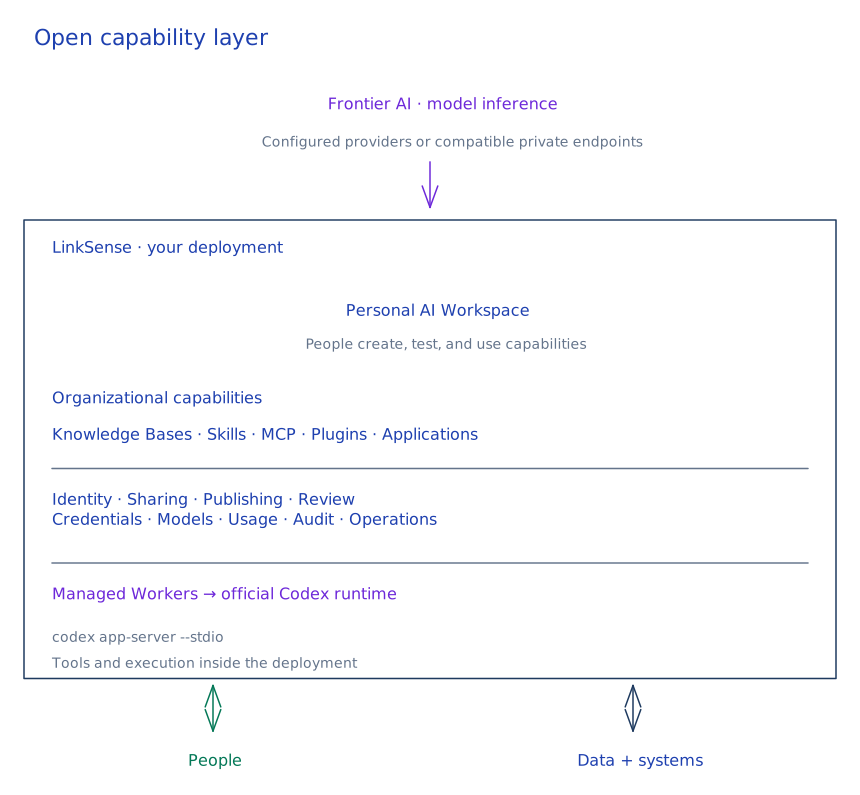
Built on the open-source Codex runtime
LinkSense runs the upstream @openai/codex package in its managed Workers and communicates with codex app-server --stdio over JSON-RPC. It does not fork Codex or replace its agent loop. It does not require the Codex web app or a LinkSense-hosted runtime. Model inference is configured separately.
| Codex handles | LinkSense handles |
|---|---|
| Reasoning and turns, native tools, Skills and Plugins, subagents, and sandbox semantics | Workspaces, identity and resource access, publishing and governance, model configuration, Worker management, persistence, usage, and operations |
The upstream runtime uses the Apache-2.0 license. Codex is a trademark of OpenAI. LinkSense is an independent project and is not affiliated with or endorsed by OpenAI.
Open source and self-hosted
Run LinkSense on your own servers, private cloud, or VPC. You can inspect and modify the source and choose your models and integrations. A self-hosted deployment does not require a LinkSense-operated cloud control plane or online license activation.
With private model endpoints, local Knowledge, and local MCP services, prompts, files, task history, indexes, credentials, and audit records can stay on infrastructure you control. External providers and integrations may still receive data when configured. Self-hosted does not mean air-gapped. See model configuration and the repository's license and attribution exceptions.
System architecture
The web workspace submits tasks to the API. The API handles identity, permissions, usage, and task state. The Runner manages the Docker Workers that execute tasks.
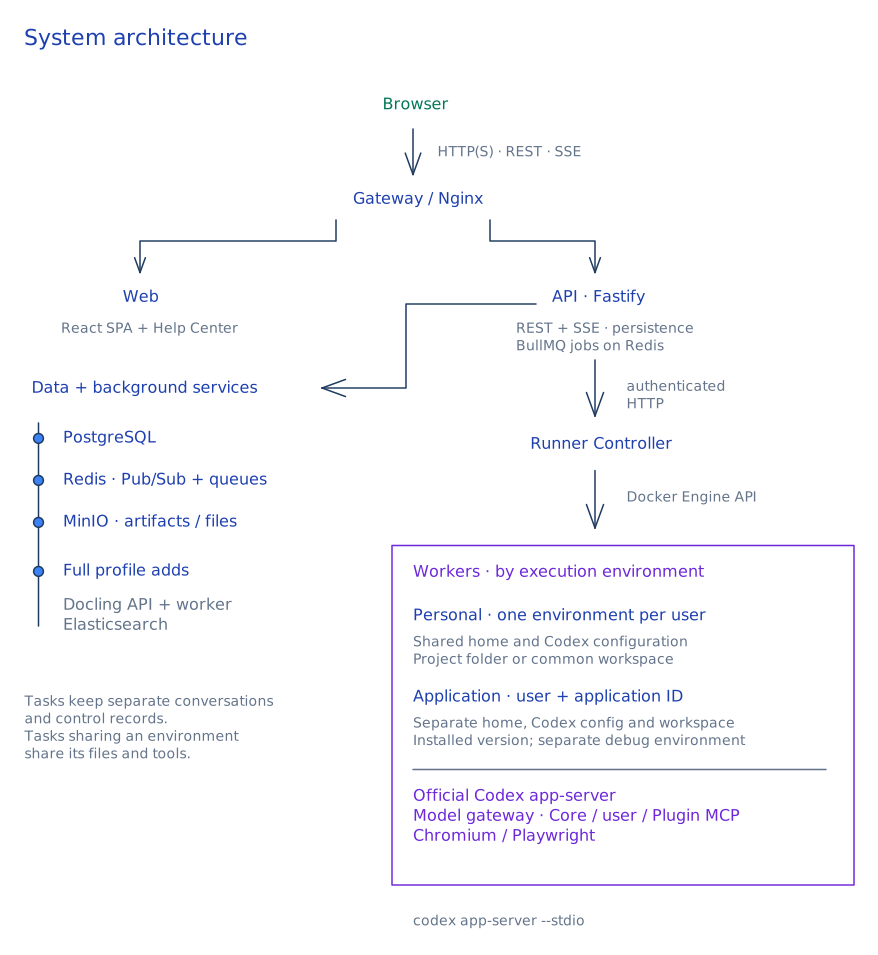
| Layer | Components |
|---|---|
| Workspace | React, TypeScript, Vite, TanStack Query |
| Services and storage | Node.js, Fastify, PostgreSQL, Redis, S3-compatible object storage |
| Execution | Per-user Docker Workers, Codex app-server |
| Full Knowledge | Docling document parsing, Elasticsearch indexing and retrieval |
Worker model
LinkSense starts and reuses a Docker Worker per active user. Same-user tasks can share HOME, CODEX_HOME, and project files. Idle Workers are reclaimed; per-user package environments can persist, and generated artifacts are stored independently in object storage.
Task execution path
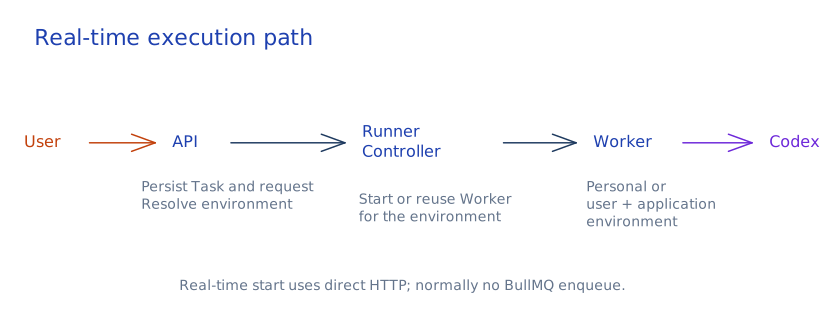
For a normal real-time start, the API persists the task and dispatches to Runner over HTTP. Runner routes the work to the user's Worker, where Codex runs. Real-time starts do not normally pass through BullMQ; the queue is used for Automations and other scheduled and background work.
Event delivery
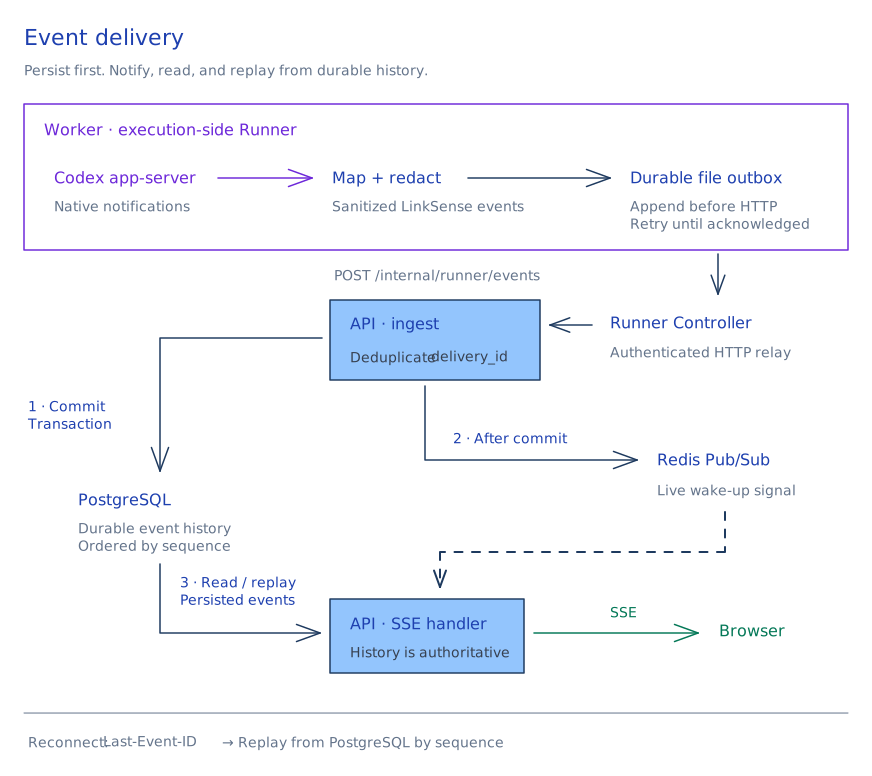
Runner maps and redacts execution events and stores them in a durable outbox before forwarding them to the API. The API persists events and streams updates to the browser via SSE.
Execution boundaries
The user's Worker, not the task directory, is the isolation boundary. Normal execution does not prompt for approval on each command. A prompt injection in an untrusted webpage, file, or tool response could lead to reading, modifying, or sending that user's shared files. Plan mode uses a read-only sandbox with network access disabled.
Task Workers run unprivileged, do not mount the Docker socket, and do not directly join the PostgreSQL or Redis service networks. The Runner controller has Docker daemon access and is a trusted management component. Normal Worker internet egress is allowed; the application does not enforce a general egress allowlist or block cloud metadata endpoints by default. Configure those controls at the deployment level and read the execution security policy before opening access to more users.